
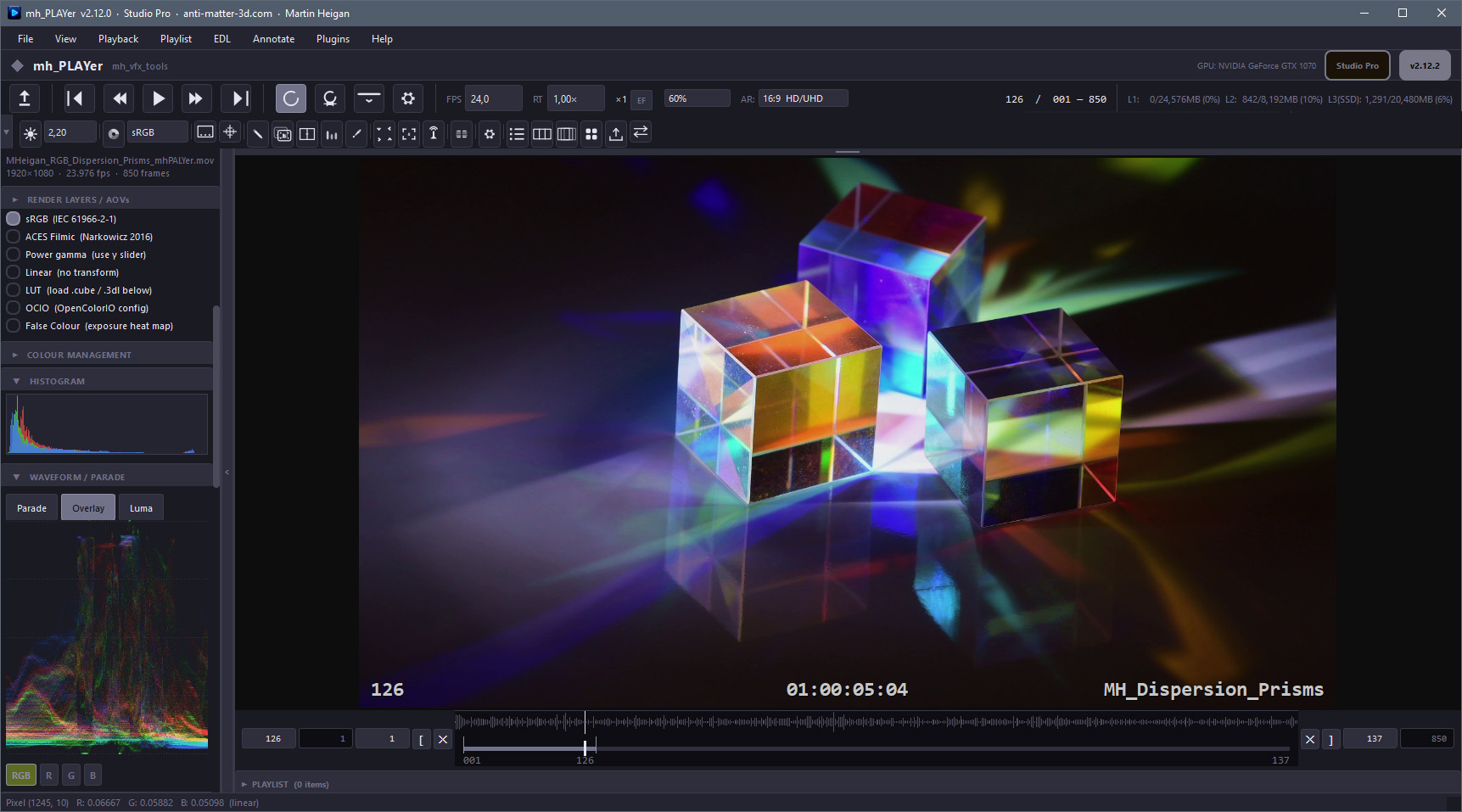
Native OpenEXR playback with the full AOV tree — multi-layer, multi-channel, float16 and float32 at any resolution. Alongside EXR, mh_PLAYer handles PNG, TIFF, JPEG, DPX, and Radiance HDR (.hdr) image sequences, plus MP4, MOV, MKV, AVI, WebM, and WMV video files via a bundled FFmpeg build.
Colour management is built in. Choose from sRGB, ACES Filmic, Power Gamma, or Linear display modes.
Load a .cube or .3dl LUT, or apply a live ASC CDL grade — slope, offset, power, and saturation, with .cc import / export.
Or plug in a full OpenColorIO pipeline — OCIO is bundled in the distribution, requires no separate installation, and picks up the $OCIO environment variable automatically if your studio already has it set.
EXR headers are inspected on load to detect ACES containers and scene-linear data automatically, applying the correct display mode without manual selection.
A three-level frame cache — L1 and L2 in RAM, L3 on SSD — keeps playback smooth even for large EXR sequences. L1 stores raw float data so channel and colour mode changes are instant. L2 stores display-ready uint8 frames for immediate playback on revisit. L3 persists across sessions and pre-caches playlist clips in the background.
Frame stride lets you load and play every 2nd, 3rd, 4th, or 5th frame at real-time speed — indispensable for a rapid first pass on a long overnight render. The ×N label in the transport bar cycles stride on the fly.
The transport bar has a collapsible icon toolbar — quick-access icons across two rows covering display, colour mode, HUD, guides, annotation, A/B compare, scopes, pixel inspector, onion-skin, playlist, EDL timeline, export, remote review, synced review, manual, and preferences. Sidebar-anchor icons expand the panel and scroll directly to the relevant section.
A/B compare gives you two modes. Wipe mode — press [ — freezes the current frame as a B reference and overlays it behind a draggable divider. Load an independent B sequence for live frame-by-frame comparison as you scrub. Diff mode computes the absolute per-pixel difference |A−B| amplified up to 32×, making single-pixel compositing errors visible against solid black.
The annotation toolset covers freehand pen, line, arrow, rectangle, and text overlays, stored in normalised coordinates so they scale correctly across proxy levels. Each frame can carry a voice note — a per-frame WAV recorded directly in the player, saved in a sidecar JSON and restored from the workspace file.
View and composite stereo pairs as anaglyphs directly in the player. Load two separate eye sequences or open a single multi-camera EXR and let mh_PLAYer auto-detect the layer pair — supporting 11 common stereo naming conventions. Four anaglyph presets cover the main production workflows, with optional gamma correction to reduce colour fringing on scene-linear EXRs.
Correct anamorphic and non-square pixel sources on the fly. Select from 13 standard presets in the transport bar or sidebar, and the canvas redraws immediately — letterboxed or pillarboxed as needed. The active ratio is saved to preferences and workspace. The CLI --ar flag applies the same correction headlessly to all output formats.
The Studio Pro tier adds the advanced collaboration and automation layer on top of every production feature — an editorial multi-clip timeline, frame-accurate review sync across the studio LAN, and a Python plugin host for extending the player into your pipeline. These three features require a Studio Pro license or an active trial.
Assemble a cut from multiple sources — image sequences and video clips together — on a real timeline. The non-modal EDL Editor stays open while you play, with a live cyan playhead tracking position across the track. Drag clip blocks to reorder, drag their edges to trim, and the player builds the timeline from your native .mhedl file. Send an existing playlist straight to a timeline in one step.
.edl files. Drop-frame aware — correct FCM and timecode at 29.97 / 59.94.--convert cut.mhedl out.mp4 — to video or an image sequence. Farm-safe.Run a frame-accurate review across multiple mh_PLAYer stations on the same network. One station hosts the session; others discover it automatically and join. Transport is host-authoritative but bi-directional — anyone can drive play, scrub, and frame steps, and every screen stays locked together. This is separate from the free browser remote review, which remains available for sharing a single frame to any device with no software installed.
Extend the player with your own Python. Drop a script into the plugins/ folder and it loads automatically at startup. The mh_player_api module gives read access to the current frame, playlist, and EDL state, fires hooks on frame change, file open, and export complete, and lets you add your own items to the Plugins menu — pipeline submission, shot-tracker lookups, custom exports, whatever your studio needs.
def log_frame(idx, path):
print("frame", idx, path)
api.on_frame_change(log_frame)
api.register_menu_item("Show playlist", lambda: print(api.get_playlist()))
mh_PLAYer is a fully functional player without a license. Download it, extract the ZIP, and use it immediately — no account, no time limit, no reduced quality. The core player, all display and colour management tools, the full QC toolkit, stereo/anaglyph, aspect ratio correction, and the pipeline CLI are available to everyone. A Standard license (Individual or Studio) unlocks the production workflow features for active review and delivery; Studio Pro adds the advanced multi-clip, collaboration, and automation tools. Individual and Studio share the same feature set and differ only in machine binding — single machine vs organisation-wide.
✓ All formats — EXR, DPX, PNG, TIFF, MP4, MOV…
✓ Multi-layer EXR & AOV browser
✓ Colour management — sRGB, ACES, OCIO, LUT
✓ ASC CDL grade — slope/offset/power + saturation, .cc I/O
✓ EV exposure & gamma controls
✓ Channel isolation (R / G / B / A)
✓ Frame stride & onion-skinning
✓ Three-level frame cache (L1/L2/L3)
✓ Aspect ratio — 13 presets (GUI + CLI)
✓ Stereo / Anaglyph viewer — 4 presets
✓ Waveform / parade, histogram, pixel inspector
✓ HUD overlay (frame, SMPTE TC, shot name)
✓ Pipeline CLI (viewer / convert / check)
✓ Nuke flipbook integration
✓ Browser remote review server
✓ No time limit
✓ Per-frame voice notes (WAV sidecar)
✓ A/B Compare — wipe & diff modes
✓ |A−B| × amplify difference (1–32×)
✓ Playlist — multi-clip, reorder, per-clip trim
✓ M3U / M3U8 import & export
✓ SSD pre-caching between clips
✓ Audio import (WAV/MP3/FLAC/AIFF)
✓ Export Frames — PNG, TIFF, EXR with burn-in
✓ Export Video — H.264, H.265, ProRes
✓ Slate — shot, scene, take, artist, logo
✓ Burn-in — frame, TC, custom text, watermark
✓ Workspace save/load (.mhplay) & Quick Save
✓ EDL / Multi-Clip Timeline
✓ Non-modal EDL editor — drag-reorder, trim handles, live playhead
✓ Loop playback & seamless pre-warmed cuts
✓ Grade persists across cuts
✓ CMX 3600 import / export — drop-frame aware
✓ Headless EDL render via CLI
✓ Send Playlist to Timeline
✓ Synced Remote Review — frame-accurate LAN sync + auto-discovery
✓ Plugin scripting — Python + mh_player_api
A single exe ships three operating modes — GUI viewer, headless video encode, and sequence validation. Farm-safe. No display required for convert and check modes.
MH_PLAYER_PATH, drop into your .nuke folder, register in menu.py — replaces Nuke’s default flipbook with $OCIO passed through automatically.
.mhplay file.
plugins/ folder. The mh_player_api module exposes frame, playlist, and EDL state, fires on-frame / on-open / on-export hooks, and can register custom menu items — loaded automatically at startup.
The --convert mode supports headless anaglyph compositing and aspect ratio correction — no GUI, no display required. Both work with all output formats (PNG, TIFF, EXR, MP4, MOV) and can be combined in a single pass.
--anaglyph — Enable anaglyph compositing in convert mode--anaglyph-mode — rc_half · rc_grey · ab_half · gm_half (default: rc_half)--right-eye FILE — Right-eye sequence (two-sequence mode)--stereo-exr — Input is a single multi-camera EXR (auto-detects L/R layers)--eye-swap — Swap L/R eye assignment (invert depth)--anaglyph-gamma — Linearise before mix, re-gamma after--ar RATIO — Aspect ratio correction (e.g. 2.39 Scope, 1.85 Flat, 1.778 HD)
mh_player --convert --anaglyph --stereo-exr camera_stereo.####.exr out.mp4
mh_player --convert --anaglyph --anaglyph-mode rc_grey --eye-swap left.####.exr --right-eye right.####.exr review.mp4
mh_player --convert --ar 2.39 beauty.####.exr scope_review.mp4
mh_player --convert --anaglyph --ar 2.39 left.####.exr --right-eye right.####.exr scope_anaglyph.mp4
mh_player cut.mhedl --play
mh_player review.m3u8 --play
mh_player --convert cut.mhedl timeline_render.mp4
mh_PLAYer ships two ways — a self-contained ZIP you extract to any folder (no admin rights, no Python), or a signed Windows installer for a guided per-user setup with no admin / UAC prompt. FFmpeg and OpenColorIO are bundled either way. With the ZIP, use Help → Manage Shortcuts… to create Desktop and Start Menu shortcuts at the correct exe location; the installer can create those (and a PATH entry) for you. To activate a license, use Help → Install License… — browse to your signed license file and mh_PLAYer validates and installs it.
◆ Signed release catalogue (
release_manifest.cat) shipped with every release◆ SHA-256 checksums (
SHA256SUMS.txt / SHA256SUMS.yaml) for every file◆ Signed self-extracting archive — verify what you run before you run it
◆ Submitted to Microsoft WDSI and VirusTotal before every release
• HDR / Radiance RGBE (.hdr) — Reinhard tone-map
• DPX, PNG, TIFF, JPEG image sequences
• MP4, MOV, MKV, AVI, WebM, WMV via bundled FFmpeg
• R / G / B / A channel isolation on all source types
• Frame stride — play every 2nd–5th frame at real-time
• Smart zoom — 100% for small images, fit for large
• Zoom accepts typed values — 37, 62.5% or fit
• Three-level frame cache — L1/L2 RAM + L3 SSD
• Linear video read-ahead — clips decoded in order into RAM ahead of the playhead; scrubbing the cached span is instant
• Sequence gap detection with exact missing frame ranges
• SMPTE timecode — configurable start, click to toggle
• False Colour — exposure heat map keyed to 18% grey (GUI + CLI)
• Two LUT slots — Display LUT (replaces the transform) + Source LUT (scene-linear, before it)
• LUT formats — .cube (1D, 3D, or 1D shaper + 3D in one file) and .3dl
• ASC CDL grade — slope/offset/power + saturation; .cc import/export
• OpenColorIO — fully bundled, no install required
• Auto-loads $OCIO environment variable
• Auto colour space detection from EXR header on load
• EV exposure (±8 stops) and gamma — spinbox, live labels
• EV resets on new file open (workspace preserves value)
• Diff mode — |A−B| × amplify (1–32×) full-frame difference
• Multi-View Compare — up to 9 stills side by side, synced zoom/pan
• B Offset — sync sequences with different start frames
• Annotation tools — pen, line, arrow, rectangle, text
• Per-frame voice notes — WAV sidecar, mic device selectable
• HUD overlay — frame number, SMPTE TC, shot name
• HUD shot name — from filename, folder, or custom text
• Waveform / Parade scope — vertical RGB stack, solo buttons
• Pixel inspector — linear float readout, hex sRGB, clipboard
• Histogram — live RGB overlay
• Onion-skinning — configurable ghost frames
• Stereo EXR auto-detect — 11 naming conventions
• Two-sequence mode — load L + R eye sequences independently
• Swap eyes / gamma correct before mix
• Headless anaglyph convert via CLI (--anaglyph)
• Aspect ratio correction — 13 presets (GUI + CLI --ar)
• Presets: 4:3 · 16:9 · 1.85:1 Flat · 2.39:1 Scope · IMAX · 2K/4K
• AR is per-source — resets on open, saved with the workspace
• CLI opens .mhedl timelines & .m3u8 playlists; headless EDL render
• CLI PATH Setup — adds to user PATH, no admin rights
• Nuke flipbook integration — $OCIO passed through automatically
• Remote review — built-in HTTP server, any browser on network
• Synced Remote Review (Studio Pro) — frame-accurate LAN sync
• Python plugins (Studio Pro) — six bundled, plus mh_player_api, hooks, menu items
• Workspace save/load — complete session state in .mhplay file
• Keyboard shortcuts dialog — two-column reference
• Video export — H.264, H.265, ProRes (MOV)
• Slate — shot, scene, take, artist, company, logo
• Burn-in — frame number, timecode, custom text, watermark
• Aspect ratio correction applied to all export formats
• Quick Save — current frame, PNG/TIFF/JPEG, one keystroke
• FFmpeg and OpenColorIO bundled in distribution
• Help → Manage Shortcuts… — Desktop & Start Menu
• Help → Install License… — install a license file in-app, one click
• Help → Check for Latest Version… — manual check, never automatic
• Open Sequence — Enter loads immediately at full resolution
• Collapsible sidebar — Ctrl+Tab or click strip; full-canvas mode
• Two-row icon toolbar — state saved across sessions
• Wheel-safe controls — scrolling a panel never changes a combo, spin box or slider value
• Sidebar anchors — toolbar icons scroll to relevant section
• Playlist — multi-clip, reorder, per-clip trim, M3U/M3U8, SSD pre-cache
• Preferences — cache sizes, default colour mode, timecode, FPS
• Digitally signed; signed release catalogue + SHA-256 checksums
• Non-modal EDL editor — drag-reorder, trim handles, live playhead
• Loop playback & seamless pre-warmed cuts; grade persists across cuts
• CMX 3600 EDL import / export — drop-frame aware
• Headless EDL render via CLI
• Synced Remote Review — frame-accurate LAN sync + auto-discovery
• Plugin scripting — Python + mh_player_api
• Six plugins bundled — Studio Watermark · Field Recorder · Contact Sheet · Colour Palette · Colour Theme · Test Patterns
plugins folder next to the exe — nothing to install. The downloads below are for picking up a newer or corrected plugin between releases, or for adding them to v2.12.1. Each adds its own entry to the Plugins menu. Plugin scripting is a Studio Pro feature; the Plugins menu is locked on other tiers.
See License Agreement for full terms of use.
All production features.
Perpetual — no expiry.
All production features.
Perpetual — no expiry.
Perpetual — no expiry.
License keys are issued manually — once you receive your license file, install it in-app via Help → Install License…. See License Agreement for full terms.
anti-matter-3d.com | © Martin P. Heigan