mh_vfx_tools
mh_LTC_Generator
Professional SMPTE LTC timecode generator for Windows.
mh LTC Generator turns your Windows PC and audio interface into a professional SMPTE Linear Timecode generator. It encodes timecode data into a bi-phase mark audio signal — send it to any audio output and sync cameras, recorders, and DAWs on set or in the studio. No dedicated hardware required. No Python. No dependencies. Extract the ZIP and run.
Windows x64 SMPTE ST 12-1 SMPTE ST 12-3 HFR NTP Sync 48 kHz 15 Frame Rates Free to Try
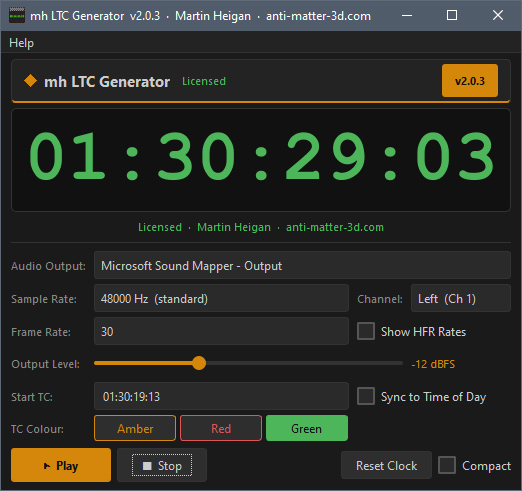
mh_LTC_Generator turns your Windows PC and audio interface into a professional SMPTE LTC timecode generator.
TIMECODE
Signal & Sync
What Is LTC & How It Works

SMPTE Linear Timecode (LTC) is an audio-frequency signal that encodes hours, minutes, seconds, and frame numbers as a bi-phase mark waveform. It travels down a standard audio cable — just like any other audio signal — and is recorded directly onto a spare track of a field recorder, camera audio channel, or DAW. Any device that records or reads audio can carry or decode LTC.

On set, a timecode generator is the sync heartbeat of a multi-camera or multitrack audio shoot. Every camera, recorder, and audio device reads the same timecode and stamps it on each frame and sample. In post-production, those stamps are used to align picture and sound automatically — no clapping, no manual sync, no drift.

mh LTC Generator runs on any Windows PC with an audio interface. Select your output device, choose your frame rate, and click Play. The LTC signal appears immediately on the selected output. A fractional sample accumulator drives the engine — each frame receives exactly the right number of audio samples over time, keeping the signal drift-free even at pull-down rates like 29.97 and 59.94 fps where most software generators accumulate error.

Film & TV Production
Sync multi-camera shoots and location sound. LTC on the audio track of each recorder eliminates manual sync in the edit.
Commercial & Broadcast
Lock to a broadcast reference or generate an independent timecode master for a multi-device commercial shoot.
DAW & Studio
Sync a DAW to picture via LTC on any audio input. No dedicated sync hardware — any interface with a spare input will work.
Quick Start
1 Select your audio output device from the dropdown. Any WASAPI-compatible output works — a dedicated audio interface is recommended for professional use.
2 Choose your frame rate. Default is 25 fps (EBU / PAL). Toggle Show HFR Rates to access high frame rate options up to 120 fps. Match the rate exactly to your camera. Note: at 60 fps and above, audio sync is accurate — frame number encoding above 99 is non-standard (see manual, Section 12.5).
3 Enter a start timecode or enable Sync to Time of Day for automatic NTP lock with sub-second frame alignment.
4 Click Play. LTC begins immediately. Enable Compact to collapse the interface to just the timecode display and dock it above your taskbar while you work.
FRAMERATES
Standard & High Frame Rate
Frame Rate Support

The LTC frame rate must match your camera or recorder exactly — a mismatch causes drift that accumulates throughout the recording. mh LTC Generator supports all six SMPTE ST 12-1 standard rates plus nine high frame rate extensions from SMPTE ST 12-3, covering everything from 24 fps cinema to 120 fps slow-motion capture. Note: at 60 fps and above, audio sync is sample-accurate — frame number encoding above 99 is non-standard in this version (see manual, Section 12.5). A fractional sample accumulator ensures zero drift even at pull-down rates (29.97, 47.95, 59.94 fps) where the samples-per-frame value is not a whole number.

Standard Frame Rates — SMPTE ST 12-1
Visible by Default
23.976
24 000 ÷ 1001 fps · NDF
Cinema pull-down, HD streaming. The standard digital cinema pull-down rate.
24
24.000 fps · NDF
Digital cinema and DCP. True 24 fps for theatrical delivery.
25 DEFAULT
25.000 fps · NDF · EBU / PAL
European broadcast, PAL video, international co-productions.
29.97
30 000 ÷ 1001 fps · NDF
NTSC video, non-drop frame. Frame count is exact; will drift from wall clock over time.
29.97DF
30 000 ÷ 1001 fps · Drop Frame
NTSC broadcast. Skips frames 0&1 each minute (except every 10th) to stay wall-clock accurate.
30
30.000 fps · NDF
Music production, some North American broadcast.
High Frame Rate Extension — SMPTE ST 12-3
Enable via “Show HFR Rates” in the Controls Panel

DSLR and mirrorless cameras commonly shoot 50, 60, and 120 fps for slow-motion. Cinema cameras reach 96 and 120 fps. mh LTC Generator covers all of them — including pull-down variants and their drop-frame equivalents — with the same drift-free fractional accumulator used for standard rates. Audio sync is accurate at all rates. At 60 fps and above, frame number encoding above 99 is non-standard in this version — see the user manual, Section 12.5.

47.95 & 48
HFR cinema. 47.95 = 48 000÷1001 pull-down. 48.000 exact for HFR DCP.
50
PAL high frame rate. Common with Sony, Canon, and Fuji mirrorless in slow-motion mode.
59.94 & 59.94DF
NTSC HFR. Non-drop and drop-frame variants for broadcast-accurate time-of-day sync.
60
NTSC HFR exact. DSLR and mirrorless slow-motion, sports, gaming capture.
96 & 100
High-speed cinema. 96 = 4×24 fps. 100 = 4×25 fps PAL HFR (SMPTE ST 12-3).
120 ⚠ See note
4×30 fps NTSC HFR (SMPTE ST 12-3). Maximum rate supported.
OUTPUT
Level, Channel & Sync
Output Settings
Output Level

LTC level matters. The bi-phase mark waveform depends on precise transition timing — if it clips on the recorder input, the transitions soften and the decoder loses lock or miscounts frames. mh LTC Generator provides a −18 to 0 dBFS slider with a default of −12 dBFS. Set the level so your recorder’s input meter peaks in the amber range.

−18 dBFS
EBU Nominal
Calibrated professional systems aligned to 0 dBu.
−12 dBFS
Default
Good practical level for most audio interfaces and camera inputs.
−6 dBFS
Elevated
Use only if your signal chain has a high noise floor.
0 dBFS
Avoid
Clipping corrupts transitions and causes decode failures.
Output Channel

LTC is mono. Route it to whichever channel your recorder expects.

Left — Ch 1 DEFAULT
LTC on left channel. Right channel silent.
Right — Ch 2
LTC on right channel. Left channel silent.
Both
LTC duplicated on all available output channels. Useful when feeding multiple recorders.
Sample Rate

Match the sample rate to your audio interface clock. Mismatched rates cause LTC to play back at the wrong speed.

48 000 Hz DEFAULT
Film, television, broadcast — industry standard.
44 100 Hz
Music production and DAW-based workflows.
96 000 Hz
High-resolution audio or HFR production.
Time of Day Sync & Compact Mode
Sync to Time of Day
At Play, queries pool.ntp.org for the current real time. Sub-second frame alignment calculated from fractional seconds — if your shot starts at 14:32:07.640 at 25 fps, the generator starts at frame 16 of that second. Falls back to the system clock if the NTP server is unreachable.
Compact Mode
Hides the Controls Panel and collapses the window to just the TC display, status strip, and transport buttons. The window docks just above the taskbar automatically. TC colour stays selectable — choose Amber, Red, or Green to match your monitoring setup. LTC continues uninterrupted while toggling.
LICENSE
Access Model
Free to Try — Individual License

mh LTC Generator is fully functional without a license. All features are available in free mode — all frame rates, all output settings, NTP sync, compact mode, and TC colour selection. Free mode runs for 75 minutes per calendar day, resets at midnight, and is designed for equipment checks and brief test runs. An Individual license removes the daily limit entirely.

Free — No License Required
✓  All frame rates — standard and HFR
✓  All output levels (−18 to 0 dBFS)
✓  Channel routing — Left / Right / Both
✓  Sample rate selection — 48k / 44.1k / 96k
✓  NTP time-of-day sync
✓  Compact mode
✓  TC colour selection
✓  Drop-frame timecode
✓  Any WASAPI audio device
Daily Limit
75 minutes of LTC generation per calendar day. Resets at midnight. Remaining time shown in the status strip.
Individual License
✓  Everything in Free mode, plus:
✓  Unlimited daily LTC generation
✓  No daily time limit
✓  No interruptions during a shoot day
✓  Licensed to your name & machine
✓  MAC-address bound — no expiry
✓  Delivery by email within 24 hours
✓  Re-issued free of charge if machine changes
How Licensing Works
Go to Help → Register / License… in the app. A pre-filled email opens with your MAC address already inserted — just add your name and send.
75 minutes per day is enough for a full equipment check and a test run. For a full shoot day, an Individual license removes all limits. One machine. No expiry. No subscription.
DISTRIB
Release & Security
Distribution

mh LTC Generator is distributed as a self-contained ZIP archive. Extract it to any folder and run — no installer, no administrator rights, no Python, no .NET, no Visual C++ redistributables.

ZIP Contents
mh_LTC_Generator_v2_0_3.zip
  mh_LTC_Generator_Win_x64_v2_0_3.exe  —  Signed application
  mh_LTC_Generator_v2_0_3_User_Manual.pdf
  LICENSE.pdf  —  End User License Agreement
  README.txt
Security & Verification
◆  Compiled exe is digitally signed — OV code-signing certificate (Certum), RFC 3161 timestamped
◆  Submitted to Microsoft WDSI and scanned on VirusTotal before every release
◆  SHA-256 checksums provided with each release for independent verification
mh_LTC_Generator
Version 2.0.3  ·  Windows x64  ·  ZIP
Self-contained ZIP. Extract and run — no installer, no admin rights, no Python. Free mode provides 75 minutes of generation per day. An Individual license removes the daily limit.
System Requirements
OS Windows 10 / 11  64-bit
Audio Any WASAPI-compatible output device
CPU Dual-core 2 GHz or faster
RAM 4 GB
Disk 100 MB free
Admin Not required
mh LTC Generator — All Rights Reserved · Martin P. Heigan
See License Agreement for full terms of use.
PURCHASE
Individual License
Purchase a License
Individual License
$50
Per License  ·  Single Machine
MAC-address bound to one machine.
No expiry. No subscription. No time limit.
All features unlocked immediately.
Delivery by email within 24 hours.
Buy Now — PayPal
How It Works
1 Purchase via PayPal above — card payments accepted, no PayPal account required.
2 In the application, go to Help → Register / License… A pre-filled email opens with your machine’s MAC address already in the body. Add your name, company, and email address and send.
3 Your ltc_license.dat is generated and sent to your email within 24 hours.
4 Copy ltc_license.dat to the mh_LTC_Generator_v2_0_3 folder and restart the application. The header shows your name in green — no time limit.
If you change machines or replace your network adapter, contact me with your original registration details.
Payments processed securely via PayPal — no PayPal account required, card payments accepted.
License keys are issued manually. See License Agreement for full terms.
TIMECODE
MH_LTC_GENERATOR
HOME » TOOLS » MH_LTC_GENERATOR


  anti-matter-3d.com | © Martin P. Heigan