
MH_Toos SOFTWARE
MH_TOOLS software & Utilities
As a Technical Director in the CGI industry, I build Python tools to automate workflows and solve problems every day — and I love doing it. Outside of film, series and game production work, I bring that same mindset to other areas I’m passionate about, from Astrophotography and Macro Photography to practical CGI and VFX utilities.
Quick Links >> Jump to section.
All non-commercial software on my site is free to download and use, and shared under a CC BY-NC-ND 4.0 License.
![A Narrowband HOO Palette image of the faint emission nebula Sharpless 308 (also cataloged as Sh2-308, RCW 11, and LBN 1052).
Sh2-308 is an emission nebula and HII region located near the center of the constellation Canis Major, composed of ionised Hydrogen. It is about 8 degrees south of Sirius, the brightest star in the night sky. The nebula is bubble-like, surrounding a Wolf-Rayet star named EZ Canis Majoris. This star is in the brief, pre-supernova phase of its stellar evolution.
About this image:
This image is the result of photographing over from the Southern Hemisphere, over several nights as the weather permitted (from dark rural skies to my Pier at home). Deep Sky Objects like this is a challenge, as it pushes the limits of my modest Telescope gear (especially my mount).
Technical Info:
24 x 600 sec. 7nm Hydrogen-Alpha (Ha).
24 x 600 sec. 6.5nm Doubly Ionized Oxygen (OIII).
William Optics Star 71mm f/4.9 Imaging APO Refractor.
Sensor cooled to -15°C on my QHY163M.
Calibration frames: Bias, Darks and Flats.
SGP Mosaic and Framing Wizard.
Astrometry.net ANSVR Solver via SGP.
Pre-Processing and Linear workflow in PixInsight,
and finished in Photoshop.
Martin
-
[Home Page] [Photography Showcase] [Flickr Profile]
[Facebook] [Twitter] [My Science & Physics Page]](https://anti-matter-3d.com/sitepad-data/uploads/2024/02/Dolphin_nebula.jpg "Sharpless 308")
ASTRO PHOTO
AstroPhotography
Astronomy & Astrophotography.
Astrophotography
MH_ASTRO_TOOLS SUITE
Suite Launcher
The single place to open every tool in the suite. Full mode shows six labelled buttons; Compact collapses to a slim icon bar for keeping the Launcher visible beside your capture software. Right-click any tool button to open its PDF manual. Preferences cover window transparency, always-on-top, edge-snap, and auto-starting the Night Vision Overlay with the Launcher.
Exposure Calculator
Calculates recommended exposure time for deep-sky imaging using telescope/lens parameters, sensor specs, sky quality (Bortle), binning, and filter bandwidth. Includes planning estimates such as field of view, pixel scale, sky-limited time and limiting magnitude. All values are computed locally from an AB-magnitude photon-counting model — there is no live data fetch. Profiles save and reload a full configuration, and results export to .txt, .csv or .json.
UTC / GPS / Weather
Local time, UTC and an exposure timer alongside a saved GPS site and an auto-refreshing astronomy and weather panel. Reports sunrise/sunset, moonrise/moonset, moon phase, illumination and synodic age, temperature, dew point and condensation risk, humidity, cloud cover, mean-sea-level pressure with trend, magnetic declination, elevation and a seeing estimate. Astronomical times are computed offline; weather is fetched when the internet is available.
500 Rule Calculator
Estimates the maximum shutter speed for tripod-based nightscape photography before star trailing becomes noticeable, using focal length and sensor crop factor. Eight sensor presets from Full Frame to Micro Four Thirds, with live recalculation as you type.
Night Vision Red Screen (Overlay)
An adjustable red screen tint across the whole desktop — click-through, all monitors, always on top. Dim (black) and Tint (colour) are independent layers, so “how dark” and “how red” are separate controls, with a hue slider running from deep red to amber. Four user presets, per-monitor toggles, and a region cutout to leave one area untinted. Global hotkeys work even when another application has focus, including an instant panic-off.
Night Vision Scientific Calculator
A night-mode calculator with Regular and Scientific modes plus a memory panel for quick reuse of results. DEG/RAD trigonometry, natural and base-10 logarithms, powers and factorial. Expressions are evaluated by a restricted AST allow-list rather than Python’s eval, so it computes mathematics only.
Weather Widget
A compact night-vision desktop HUD for field use, showing observing-relevant weather at a glance without opening a browser. Reports temperature, dew point and the temperature-to-dew-point spread with a condensation-risk label (EXTREME / HIGH / MED / LOW), wind speed, barometric pressure with a trend arrow, and WMO sky condition. Metric or imperial units. Lives in the system tray rather than the taskbar, and can start automatically with Windows.
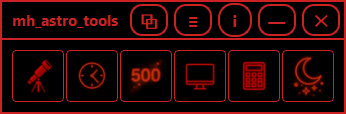



NEW RELEASE: Version 2.0.0
Windows x64 Version.
Download mh_Astro_Tools Installer from my site or from the official Release page on GitHub.
Installer Size: 171 MB.
Manuals are included with the install.
ASTRO_WEATHER_WIDGET
MH_ASTRO_WEATHER WiDGET
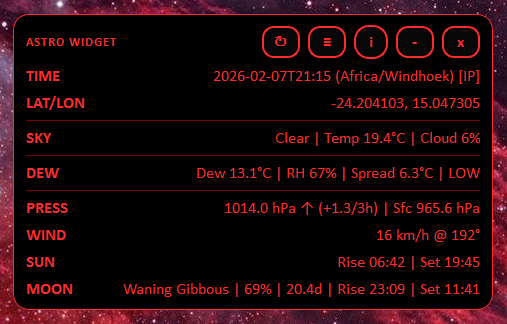
Astro Weather Widget is a compact, night‑vision‑friendly desktop widget for Astrophotography field use.
It provides quick “at a glance” environmental information without needing to open a full app or browser.
Displayed data includes:
• Time (with timezone)
• Latitude / Longitude
• Sky summary (cloud %, temperature)
• Dew point, RH, dew spread + dew risk cue (LOW / MED / HIGH)
• Pressure + 3‑hour trend
• Wind speed + direction
• Sunrise / Sunset
• Moon phase + illumination + Moonrise / Moonset
NEW RELEASE: Version 2.0.0
Windows x64 Version.
Download mh_Astro_Weather_Widget Zip from my site or from the official Release page on GitHub.
Zip Size: 35.1 MB.
Manuals are included in the Zip.

MACRO & MICRO
MACRO PHOTOGRAPHY
Macro & Photomicrography.
PHOTOMICROGRAPHY
mh_Photomicrography Tool
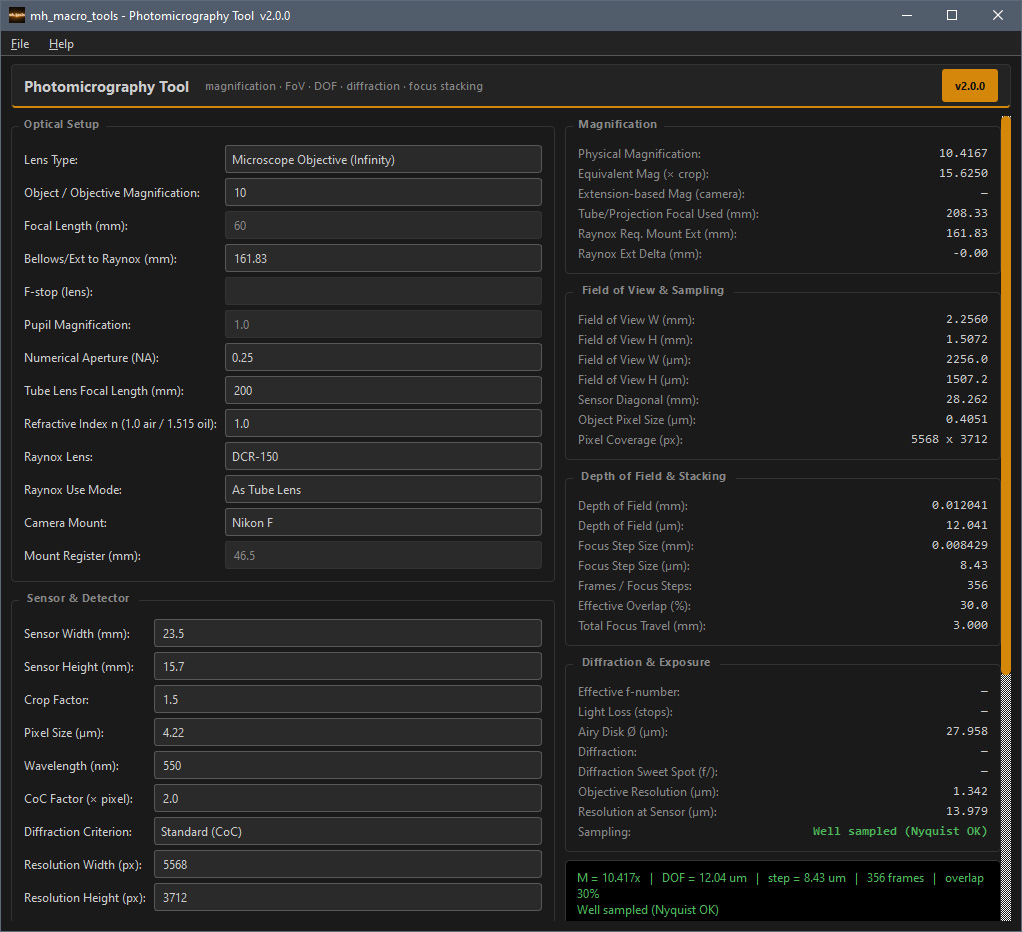
The Photomicrography & Rail Stacking Tool is a precision utility for macro and photomicrography workflows. It helps calculate magnification, field of view, depth of field, and stacking steps for a wide range of setups — from standard macro lenses to microscope objectives. Built for accuracy and efficiency, it’s suited to both scientific documentation and creative close-up work.
NEW RELEASE: Version 2.0.0
Windows x64 Version.
Download mh_Photomicrography_Tool Zip from my site or from the official Release page on GitHub.
Zip Size: 47.5MB
Manuals are included in the Zip.
MOTION CONTROL
MOTIon CONTROL
Motion Control for Photography & Videography.
MOTION CONTROL
mh_MOTION_CONTROL
mh_Motion_Control — Motion-controlled image capture for edelkrone HeadONE and SliderONE on Windows. Turntable capture in rings, with photogrammetry projects for RealityCapture / RealityScan, Metashape and COLMAP. Keyframed Bézier moves (timelapse, stop motion, real-time video) on a linked pan, tilt and slider rig, and HDR panoramas with PTGui and Hugin projects. Every photo is saved with the position it was actually taken at. Precision Tuning learns your gear, and it works with any camera brand.
NEW RELEASE: Version 1.0.0
Windows x64 Version.
Download mh_Motion_Control Zip from my site or from the official Release page on GitHub.
Zip Size: Coming Soon
Manuals are included in the Zip.

3D CGI VFX MOCAP
CGI / VFX & MOCAP TOOLS
3D, CGI, VFX, Mocap & Post Post Production Tools
CGI & VFX Tools
MH PLAYER
mh_PLAYER
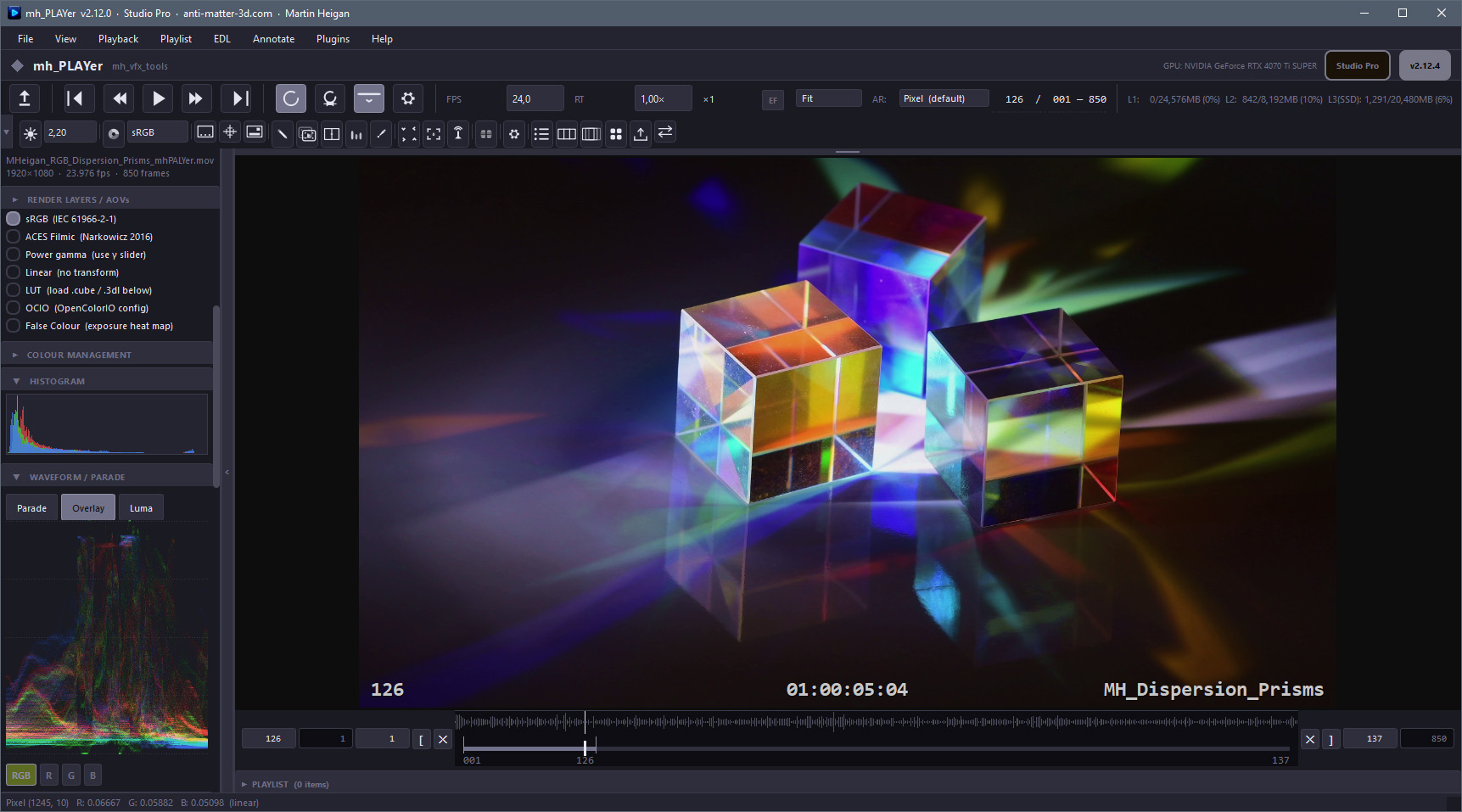
NEW RELEASE: Version 2.12.4
Windows x64 Version.
Visit the mh_PLAYer page to download the Installer or ZIP from my site, or the official Release page on GitHub.
Zip Size: 263MB
Installer Size: 184MB
Manuals are included in the Installer and Zip.
MH TIMECODE GENERATOR
mh_LTC_TIMECODE GENERATOR
mh_LTC_Generator is a real-time Linear Timecode (LTC) generator designed for studio, broadcast, and post-production use. It outputs an LTC audio signal via your selected sound device and displays the matching timecode on screen.
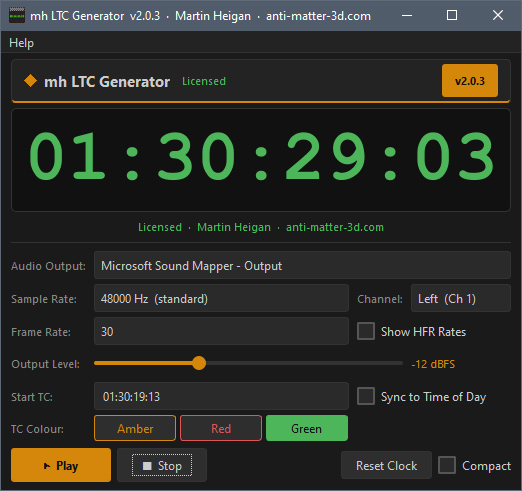
NEW RELEASE: Version 2.0.3
Windows x64 Version.
Visit the mh_LTC_GENERATOR page to download the ZIP from my site or the official Release page on GitHub.
Manuals are included in the Zip.
MH QT VIDEO SCOPES
mh_QT_VIDEO SCOPES
mh_qt_video_scopes is a PyQt-based monitoring tool designed for video and audio analysis in professional post-production environments.
It provides:
• A live video preview with overlays.
• A Waveform Monitor (luma and RGB parade).
• A Vectorscope for chroma evaluation.
• An audio level meter with LUFS-style smoothing.
• Support for:
o Video files.
o SMPTE color bars.
o Live capture devices (video + audio) via ffmpeg.

Windows x64 Version.
MH TEST TONE GENERATOR
mh_TEST_TONE GENERATOR
mh_Test_Tone_Generator is a precision audio reference and monitoring utility for broadcast operations, post-production QC, studio alignment, and acoustic tuning. It generates calibrated tones, noise, sweeps, and channel-verification patterns with true VU ballistics, peak meters, a black/green oscilloscope, and a 1/3-octave RTA. Export tools capture RTA bands or sweep RMS by octave to CSV for documentation.
Standards awareness: SMPTE / EBU R128 alignment practices (−20 dBFS / −18 dBFS) are supported.

Windows x64 Version.
MH RENAME
mh_RENAME Tool
mh_Rename replaces the friction of editing filenames one at a time with a batch workflow built around the realities of VFX production: multi-thousand-frame image sequences, dot-separated frame numbers, mixed-extension deliveries, and the constant need to rename plates, comps and render passes without destroying the originals. Every change appears in a live side-by-side preview before anything is committed, and a non-destructive copy mode leaves the source files untouched..
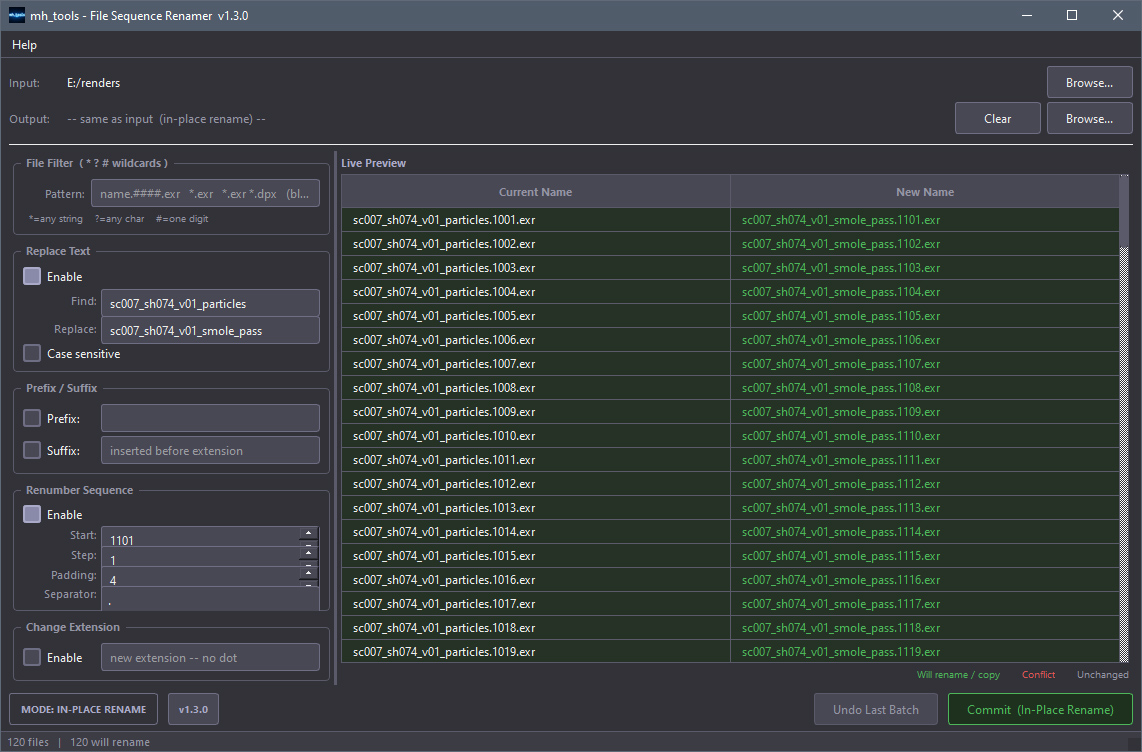
NEW RELEASE: Version 1.3
Windows x64 Version.
Download mh_Rename from my site or from the official Release page on GitHub.
Size: ZIP 46.7 MB.
Manual included in the Zip.

SCIENCE PHYSICS
SCIENCE & PHYSICS
Science, Physics & Chemistry.
Periodic Table of Elements
Periodic Table of THE Elements
What is the probability that you live in a Universe where Mendeleev and Schrödinger's Periodic Table of Elements would find its way to a Spreadsheet on your screen? Find out by downloading and observing the Periodic Table for Excel.

Download the Excel xlsx file.
Built in Python with: Mendeleev xlsxwriter.
Size: 8 KB
![This photo is to commemorate my time working at home on an animated series in 2020.
In the early stages of production, it is essential to be on-set or in the Motion Capture Studio to capture the performance of the actors. After these initial stages of an animated series or film, it is easy to work from home for the remainder of a project.
All of this is made possible by working with a core team of competent responsible people with the same vision, and a good Producer to keep the communication flowing. There are some challenges, but I don't miss rush hour traffic. All the extra hours that you gain, actually leads to increased productivity.
By sharing project recourses in the cloud, and being able to log in to the render farms and servers when needed, finally allows one to work remotley.
The dogs also approve!
Martin
-
[Home Page] [Photography Showcase] [eBook] [Twitter]
[Facebook] [3D VFX & Mocap] [Science & Physics Page]](https://anti-matter-3d.com/sitepad-data/uploads/2024/02/MHeigan_Remote_Work.jpg "Remote Work")
OTHER UTILITIES
OTHER UTILITIES
Other Tools and Utilities.
MH TIME LOGGER
mh_TIME LOGGER

GALLERY & LINKS
Gallery & Links
A short image compilation and quick links.
© Martin P Heigan

![A cropped Bi-Color Narrowband image of NGC 6188, an emission nebula located about 4,000 light-years away in the constellation Ara.
About this image:
This image is the results of imaging at several occasions and locations during the past year, and it pushes the limits of my current Telescope gear (especially my mount). It makes it very rewarding when you have to work hard for an image, and I definitely plan to add more data to get more of the faint detail.
Technical Info:
64 x 600sec. 7nm Hydrogen-Alpha (Ha) and 6.5nm Doubly Ionized Oxygen (OIII) exposures at -25°C on my QHY163M.
Astrometry info:
Center RA, Dec: 249.643, -48.270
Center RA, hms: 16h 38m 34.224s
Center Dec, dms: -48° 16' 12.036"
Size: 1.59 x 1.22 deg
Radius: 1.003 deg
Pixel scale: 3.57 arcsec/pixel
Orientation: Up is 262 degrees E of N
http://nova.astrometry.net/user_images/2312511#annotated
View this image in the <a href="http://www.worldwidetelescope.org/wwtweb/ShowImage.aspx?reverseparity=False&scale=3.572472&name=MHeigan_NGC6188_Dragons_HaOIII_1600px.jpg&imageurl=http://nova.astrometry.net/image/5168307&credits=Astrometry.net+User+(All+Rights+Reserved)&creditsUrl=&ra=250.079742&dec=-47.972060&x=1138.0&y=867.0&rotation=-82.33&thumb=http://nova.astrometry.net/image/5168312"WorldWideTelescope.
Martin
-
[Home Page] [Photography Showcase] [Flickr Profile]
[Facebook] [Twitter] [My Science & Physics Page]](https://anti-matter-3d.com/sitepad-data/uploads/2024/02/Fighting-Dragons-Nebula.jpg "Fighting Dragons Nebula")
![Experimenting with Astrophotography structure enhancement and sharpening techniques on a Macro photo of my eye.
“I... a Universe of atoms, an atom in the Universe.”
― Richard P. Feynman
Lighting:
Camera mounted Adaptalux Pod Mini with the Lighting Arm-S used as a side light for Iris structure shadowing.
Adaptalux Modular Macro Lighting System.
Martin
-
[Home Page] [Photography Showcase] [eBook] [Twitter]
[Facebook] [3D VFX & Mocap] [Science & Physics Page]](https://anti-matter-3d.com/sitepad-data/uploads/2024/02/MHeigan_Eye_MPH0900_v03s_1600px.jpg "Iris Macro")
![A wide-field Narrowband HOO Palette (R=Ha, G=OIII, B=OIII) image of a portion of the the huge Vela Supernova Remnant (also known as Vela XYZ; Gum 16; SNR G263.9-03.3; 1E 0840.0-4430; RE J083854-430902).
The Vela Supernova Remnant is in the Southern constellation Vela. Its source (a Type II Supernova) exploded approximately 11,000–12,300 years ago, at a distance of about 800 light-years away. The association of the Vela Supernova Remnant with the Vela Pulsar, is direct observational evidence of Supernovae form Neutron stars. The Vela Supernova Remnant includes NGC 2736, and it also overlaps with the Puppis Supernova Remnant. Both the Puppis and Vela Remnants are among the largest and brightest features in the X-ray sky.
Elements are made at different stages in a star's life-cycle, and spread through the Universe in Supernova explosions. “The Nitrogen in our DNA, the Calcium in our teeth, the Iron in our blood, the Carbon in our apple pies were made in the interiors of collapsing stars. We are made of starstuff.” ― Carl Sagan, Cosmos.
Technical Info:
4 Panel wide-field Mosaic.
Lights/Subs total integration time: 32 hours.
32 x 600 sec. 7nm Hydrogen-Alpha (Ha) per panel.
36 x 600 sec. 6.5nm Doubly Ionized Oxygen (OIII) per panel.
William Optics Star 71mm f/4.9 Imaging APO Refractor.
Sensor cooled to -20°C on my QHY163M.
Calibration frames: Bias, Darks and Flats.
SGP Mosaic and Framing Wizard.
PlaneWave PlateSolve 2 via SGP.
Pre-Processing and Linear workflow in PixInsight,
and finished in Photoshop.
Astrometry Info:
Center RA, Dec: 127.762, -43.909
Center RA, hms: 08h 31m 02.897s
Center Dec, dms: -43° 54' 30.752"
Size: 1.62 x 1.32 deg
Radius: 1.046 deg
Pixel scale: 3.65 arcsec/pixel
Orientation: Up is 87.3 degrees E of N
Martin
-
[Home Page] [Photography Showcase]](https://anti-matter-3d.com/sitepad-data/uploads/2024/02/Astrophotography.jpg "The Vela Supernova Remnant")
![Martin Heigan
mh@icon.co.za
http://anti-matter-3d.com
http://www.flickr.com/photos/martin_heigan
[#Beginning of Shooting Data Section]
Nikon D200
Focal Length: 60mm
Optimize Image: Custom
Color Mode: Mode II (Adobe RGB)
Long Exposure NR: Off
High ISO NR: Off
2007/02/17 16:55:14.3
Exposure Mode: Aperture Priority
White Balance: Auto
Tone Comp.: Auto
RAW (12-bit)
Metering Mode: Multi-Pattern
AF Mode: AF-S
Hue Adjustment: 0°
Image Size: Large (3872 x 2592)
1/6 sec - F/22
Flash Sync Mode: Not Attached
Saturation: Enhanced
Color
Exposure Comp.: 0 EV
Sharpening: High
Lens: 60mm F/2.8 D
Sensitivity: ISO 100
Image Comment: Martin Heigan mh@icon.co.za
[#End of Shooting Data Section]](https://anti-matter-3d.com/sitepad-data/uploads/2024/02/Stapeliad.jpg "Stapelia flavopurpurea flower")

![A 2 panel wide-field mosaic, of the cosmic dust clouds that cross the rich field of stars of Corona Australis (Latrin for the Southern Crown).
Gear:
William Optics Star 71mm f/4.9 Imaging APO Refractor Telescope.
QHY163M Sensor cooled to -30°C.
Technical Card:
Integration Time: 18 hours total (9 hours per panel)
L = 10 hours total (Binning 1x1)
R = 3 hours total (Binning 2x2)
G = 3 hous total (Binning 2x2)
B = 3 hours total (Binning 2x2)
Calibration frames:
Bias, Darks & Flats.
Image Acquisition:
Guiding in Open PHD.
Image acquisition in Sequence Generator Pro.
Plate Solving in Platesolve 2 via SGP Framing & Mosaic Wizzard.
Processing:
Pre-Processing and Linear workflow in PixInsight,
star seperation with Starnet++ Pi Plug-in,
and finished in Photoshop.
Martin
-
[Home Page] [Photography Showcase] [eBook] [Twitter]
[Facebook] [3D VFX & Mocap] [Science & Physics Page]](https://anti-matter-3d.com/sitepad-data/uploads/2024/02/Corona_Australis_o.jpg "Corona Australis")
![Symmetry in Nature.
An old macro photo of a 4 petal Stapelia tsomoensis flower, reprocessed 16 years later using some of the Astrophotography techniques.
Martin
-
[Home Page] [Photography Showcase] [eBook] [X]
[Facebook] [3D VFX & Mocap] [Science & Physics]](https://anti-matter-3d.com/sitepad-data/uploads/2024/02/Symmetry.jpg)
![A two panel wide-field mosaic of the Blue Horsehead Nebula (IC 4592), a faint reflection nebula in the constellation Scorpius. The nebula is lit by the multiple Star System Nu Scorpii.
Gear:
William Optics Star 71mm f/4.9 Imaging APO Refractor Telescope.
QHY163M Sensor cooled to -20°C.
Technical Card:
Integration Time: 24 hours total (12 hours / panel)
L = 6 hours / panel (Binning 1x1)
R = 2 hours / panel (Binning 2x2)
G = 2 hours / panel (Binning 2x2)
B = 2 hours / panel (Binning 2x2)
Calibration frames:
Bias, Darks & Flats.
Image Acquisition:
Guiding in Open PHD.
Image acquisition in Sequence Generator Pro.
Plate Solving in Platesolve 2 via SGP Framing & Mosaic Wizzard.
Processing:
Pre-Processing and Linear workflow in PixInsight,
and finished in Photoshop.
Martin
-
[Home Page] [Photography Showcase] [eBook] [Twitter]
[Facebook] [3D VFX & Mocap] [Science & Physics Page]](https://anti-matter-3d.com/sitepad-data/uploads/2024/02/Blue-Horsehead-Nebula.jpg "The Blue Horsehead Nebula")
![The Abyss
A macro photo of a Huernia clavigera X Huernia pillansii hybrid flower revisited with a twist.
This image is part of the Legacy Series.
Martin
-
[Home Page] [Photography Showcase] [eBook] [X]
[Facebook] [3D VFX & Mocap] [Science & Physics]](https://anti-matter-3d.com/sitepad-data/uploads/2024/02/Black-Hole.jpg "The Abyss")
![Martin Heigan
mh@icon.co.za
http://anti-matter-3d.com
[#Beginning of Shooting Data Section]
Nikon D200
Focal Length: 60mm
Optimize Image: Custom
Color Mode: Mode II (Adobe RGB)
Long Exposure NR: Off
High ISO NR: Off
2006/07/01 14:03:41.3
Exposure Mode: Programmed Auto
White Balance: Auto
Tone Comp.: Auto
RAW (12-bit)
Metering Mode: Multi-Pattern
AF Mode: AF-S
Hue Adjustment: 0°
Image Size: Large (3872 x 2592)
1/180 sec - F/7.1
Flash Sync Mode: Not Attached
Saturation: Enhanced
Color
Exposure Comp.: 0 EV
Sharpening: High
Lens: 60mm F/2.8 D
Sensitivity: ISO 100
Image Comment: Martin Heigan mh@icon.co.za
[#End of Shooting Data Section]](https://anti-matter-3d.com/sitepad-data/uploads/2024/02/Cokoo_Wasp-1.jpg "Wasp pollinating Euphorbia flowers (July 2006 - South Africa) by Martin Heigan.")
anti-matter-3d.com | © Martin P. Heigan